
Zoho AI Readiness
What needs to be true before deploying Revenue AI inside Zoho
Revenue AI succeeds or fails based on the condition of the system it operates in. In Zoho environments, readiness is not about AI maturity—it is about data quality, workflow clarity, and governance.
This page outlines the practical prerequisites Growthline looks for before deploying Revenue AI in Zoho. These checks are designed to reduce risk, prevent brittle automation, and ensure agents behave predictably in production
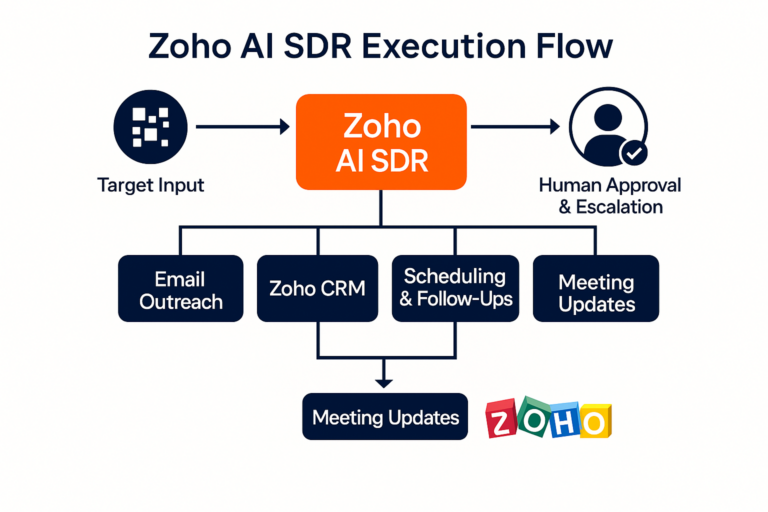
What Readiness Means (and What It Does Not)
Zoho AI readiness does not require a perfect CRM or a fully automated revenue stack. It does require a system that agents can safely execute within.
Readiness means:
- Clear ownership of revenue workflows
- A usable system of record
- Agreement on where automation is allowed to act
It does not mean:
- Advanced AI usage today
- Custom everything
- A long transformation project
-
Core Readiness Areas
1. CRM Data Baseline
Revenue AI relies on Zoho CRM as the source of truth. Before deployment, the following must be reasonably stable:- Core objects (Leads, Contacts, Accounts, Deals) are in use
- Required fields for execution are consistently populated
- Basic lifecycle stages and pipeline definitions exist
The goal is not perfection—it is predictability.
2. Workflow Clarity
Agents cannot compensate for undefined processes.
Before deploying Revenue AI, teams should be able to clearly answer:
- When should follow‑up occur?
- Who owns which stage of the funnel?
- What actions are allowed automatically, and which require approval?
Revenue AI performs best when workflows are explicit, even if they are simple
3. System Access and Integration
Revenue AI agents must be able to operate directly inside Zoho and connected systems.
Readiness requires:
- Proper CRM permissions for agent execution
- Email and calendar integration with Zoho
- Agreement on which systems are authoritative
This ensures actions are real, observable, and auditable
4. Human Oversight Model
Human‑in‑the‑loop control should be intentional, not improvised.
Before deployment, teams align on:
- Approval points for outreach and scheduling
- Escalation paths for missing data or conflicts
- Review expectations during early production use
This preserves accountability while enabling automation
5. Change Tolerance and Ownership
Revenue AI introduces a new execution layer. Someone must own it.
Readiness includes:
- A clear internal owner (sales, RevOps, or operations)
- Willingness to observe and adjust workflows
- Acceptance that early learning happens in production, not in theory
How Growthline Assesses Readiness
Readiness is assessed collaboratively and quickly.
Growthline focuses on:
- Identifying one narrow, high‑value workflow
- Verifying system conditions required for execution
- Designing a minimal working agent that can run safely
If prerequisites are missing, they are addressed before automation—not after failure.
Why Readiness Matters
Most Revenue AI failures are not AI failures—they are system failures.
By validating readiness up front, teams avoid:
- Fragile automation
- Inconsistent behavior
- Loss of trust in CRM data
Readiness ensures Revenue AI strengthens Zoho over time rather than degrading it.
Related Zoho Revenue AI Pages
- Zoho Revenue AI Overview – Why Zoho is the fastest path to production
- Zoho Agent Architecture – How SDRs and other agents are governed
- Zoho Use Cases – Common revenue workflows and expansion paths
- Zoho AI Readiness – What needs to be true before deploying the SDR
Wondering if your Zoho environment is ready for Revenue AI?
Start by reviewing a single workflow and validating the conditions for safe execution.
Click Here