
Revenue AI for Zoho
Why Zoho Is the Fastest Path to Production Revenue AI
Growthline starts Revenue AI deployments with Zoho because it provides one of the cleanest, fastest paths from system design to live execution. Zoho functions as a genuinely unified system of record across CRM, email, workflows, and automation—making it possible for Revenue AI agents to operate safely inside real revenue systems from day one.
This page explains why Zoho is the preferred starting point for Revenue AI, how Growthline works inside Zoho environments, and how teams move from concept to production without disrupting their revenue operations.
Why We Start with Zoho
Revenue AI succeeds when agents can execute directly inside the systems where revenue work actually happens. Zoho provides the architectural conditions required for this:
- Unified system of record across sales, marketing, and operations
- Clean and consistent APIs that support deterministic execution
- Native workflows and automation that complement agent behavior
- Strong SMB and mid‑market adoption, where execution speed matters
Together, these characteristics allow Revenue AI to move from design to production faster than fragmented or heavily customized stacks.
How Revenue AI Operates Inside Zoho
In Zoho environments, Revenue AI agents do not sit alongside the CRM—they operate within it.
Agents execute tasks such as research, outreach, CRM updates, and scheduling directly against Zoho CRM and connected tools. Zoho remains the source of truth for data, activity, and workflow state. Human approval points, observability, and error handling are built into the system by design.
This approach preserves data integrity while reducing the manual effort required to keep Zoho accurate and up to date.
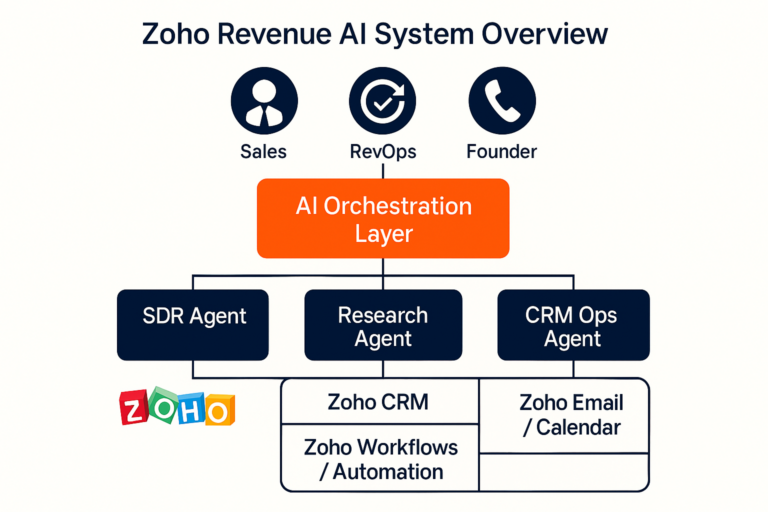
Example: Zoho‑Based Revenue AI System
At a high level, a Zoho Revenue AI system consists of:
- An orchestration layer that coordinates task‑specific agents
- Specialized agents (SDR, research, CRM operations)
- Direct execution inside Zoho CRM, email, and calendars
- Clear human‑in‑the‑loop control points
This system‑first design enables safe automation without introducing brittle logic or hidden behavior
What Teams Typically Deploy First
Most Zoho Revenue AI engagements begin with a narrowly scoped workflow that delivers immediate operational relief, such as:
- Sales development follow‑ups and scheduling
- CRM activity logging and data hygiene
- Account and contact research feeding Zoho records
Starting small allows teams to observe real agent behavior in production before expanding scope
Explore Zoho‑Specific Revenue AI Capabilities
The following pages go deeper into how Revenue AI is applied inside Zoho environments:
- Zoho AI SDR – What a production‑ready SDR agent does today
- Zoho Agent Architecture – How agents, orchestration, and governance work together
- Zoho Use Cases – Common revenue workflows and expansion paths
- Zoho AI Readiness – What needs to be true before deploying Revenue AI
Each page builds on the same system‑first principles described here.
A Practical Starting Point
Revenue AI does not require a full platform overhaul. In Zoho environments, it starts by identifying a single revenue workflow, deploying a minimal working agent, observing execution in production, and expanding deliberately.
This is how Revenue AI becomes operational—without disruption.
Ready to explore Revenue AI in Zoho?
Start with a conversation, or dive into a specific Zoho execution path.
Click Here